Convert OrCAD and Allegro to Altium, and Altium to OrCAD and Allegro
Konium Designer converts both ways. It reads OrCAD Capture designs and Allegro boards and saves them as .SchDoc and .PcbDoc files, and it writes an Altium Designer project in the ASCII form that Cadence's own importers read. It is free, with no account, and it runs on your own computer, so the design is not uploaded anywhere.
OrCAD and Allegro to Altium
- Open konium.app/app in Chrome or Edge on Windows, macOS or Linux, or install Konium Designer first.
- Choose File › Import Wizard. Under Select Type of Files to Import, choose OrCAD Designs and Libraries Files for Capture designs and libraries, or Allegro Design Files for boards.
- Click Add Folder... to take the design's folder with everything it uses, or Add Files... for single files.
- Under Output Folder, click Browse... to choose where the converted project is saved. Left empty, the project opens unsaved.
- Click Import. The project opens, and the import's report goes to the Messages panel.
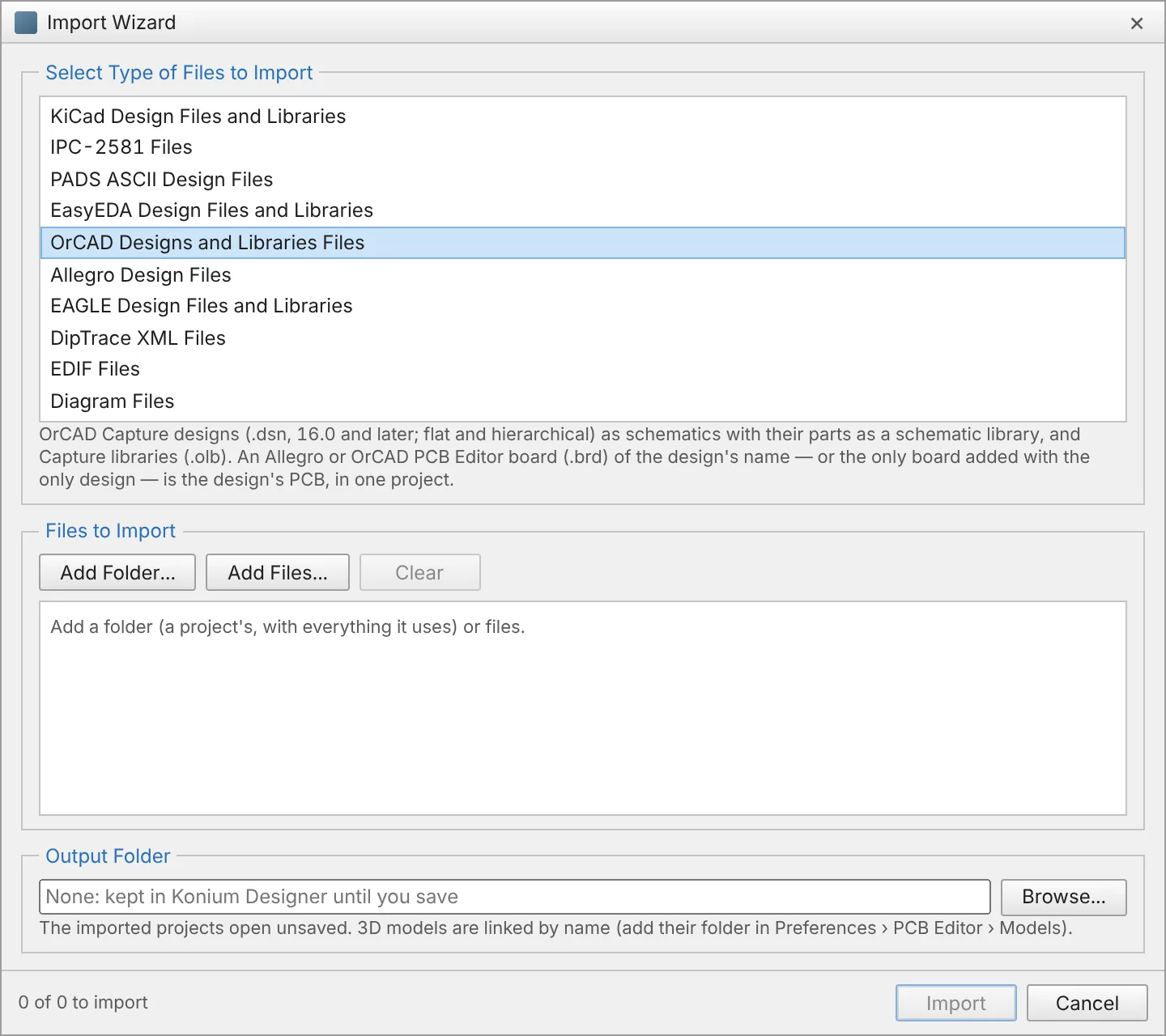
OrCAD Designs and Libraries Files. OrCAD Capture designs (16.0 and later) with their parts as a schematic library, and Capture libraries. A board of the design's name becomes its PCB. The files: .dsn, .olb, .brd.
Allegro Design Files. Allegro and OrCAD PCB Editor boards, 16.0 to 19: layers, components, nets, tracks, vias, shapes as polygon pours, keep-outs, drawings and text, constraint sets as rules, and the symbols as a PCB library. The files: .brd.
The converted project is in Altium Designer's formats: a .PrjPcb project with its .SchDoc schematics and its .PcbDoc board, and .SchLib and .PcbLib libraries beside it. Dropping the files on the window does the same as the wizard.
Altium to OrCAD and Allegro
- Open konium.app/app in Chrome or Edge on Windows, macOS or Linux, or install Konium Designer first.
- Open the Altium Designer project: drop its folder on the window, or choose File › Open Project... and pick the .PrjPcb file.
- Choose File › Export Wizard. Under Select Type of Files to Export, choose OrCAD and Allegro (ASCII Files).
- Under What to Export, tick Schematics, PCB and Libraries as wanted.
- Under Output Folder, click Browse... to choose a folder, where the files go in a folder named after the project. Left empty, they download as one zip.
- Click Export. The Messages panel lists what was written and anything left out.
What is written. The project, its sheet tree, every schematic and the board in ASCII form, for the importers in OrCAD Capture and PCB Editor 17.2 and later. Embedded images and 3D models aren't carried.
There and back
| Tool | Reads | Writes | Read and written back |
|---|---|---|---|
| OrCAD Capture | Designs and libraries (.dsn, .olb) | ASCII files that Cadence's translators read | Unchanged, the file Capture wrote, byte for byte. |
| Allegro and OrCAD PCB Editor | Boards (.brd) | ASCII files that Cadence's translators read | Unchanged, the file Allegro wrote, byte for byte. |
Good to know
- 3D models are linked by name: add their folder in Preferences › PCB Editor › Models.
- Other tools convert the same way: Formats lists them all.
Get Konium Designer
It is free, with no account. Install it from Chrome or Edge, keep it as one file, or try it in a browser tab. Version 26.209.